pebble-11weeks-config
Pebble 11 Weeks Watchface
A beautiful calendar watchface for Pebble showing the current week of the year with customizable display options and live preview.
🎯 About
This is a repackaged version of the excellent 11 Weeks Watchface originally created by programus@gmail.com.
Full credit goes to the original author for creating this beautiful watchface.
💾 Installation
Option 1: Rebble App Store (Recommended)
🏪 Install from Rebble App Store
The easiest way to install and keep the watchface updated.
Option 2: Direct Download
📦 Download 11weeks-watchface-v2.8.1.pbw (Latest - v2.8.1)
Or download from GitHub Releases
Features:
- ✅ Settings work perfectly
- ✅ Full Pebble 2 support
- ✅ All platforms: Pebble, Pebble Steel, Pebble Time series, Pebble 2
Screenshots
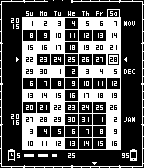
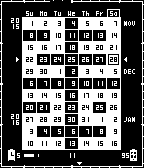
Installation Steps
- Install from Rebble App Store OR download the
.pbwfile and transfer it to your phone - Open with the Pebble app - it will be installed automatically
- Open the watchface settings in the Pebble app
- Configure your preferred options with live preview!
⚙️ Configuration Options
The page offers the following customizable settings:
- Seconds: Display seconds (increases battery usage)
- Outline Frame: Animated frame border (increases battery usage)
- Pebble Battery: Show watch battery level (now displays two digits: 15, 42, 73)
- Phone Battery & Bluetooth: Show phone battery and Bluetooth status
- Week starts on Monday: Start the week on Monday instead of Sunday
- Quiet Time Indicator: Show moon icon when Quiet Time is active
- Week Number (CW): Display ISO 8601 calendar week number next to current week indicator
Note: Disabling the outline frame and seconds reduces battery consumption as the watchface will update once per minute instead of once per second.
✨ Features
- ✅ Embedded Configuration: No cloud dependency - config page is embedded directly in the watchface
- ✅ Persistent Settings: Your configuration is saved and loads correctly each time
- ✅ Works Offline: All functionality works without internet connection
📜 Version History
v2.8.1 (Current - NEW FEATURE! 📅)
- Week Number (CW) Display - shows ISO 8601 calendar week number
- Displays to the left of the current week arrow indicator
- Configurable via settings toggle
- Safe implementation that preserves calendar integrity
- Tighter weekday headers - reduced letter spacing for cleaner look
v2.7 (Previous)
- Quiet Time Indicator - shows moon icon when Quiet Time is active
- Icon appears above watch battery when Do Not Disturb is enabled
- Configurable via settings toggle
- Polls Quiet Time status every minute
v2.6 (Previous)
- Embedded configuration page - no cloud dependency!
- Config page embedded as Data-URI directly in JavaScript
- Works completely offline
- Simplified, clean settings interface
- All settings fully functional
- Improved reliability and faster loading
v2.4 (Previous)
- Week starts on Monday option with instant updates
- Two-digit battery display (15, 42, 73 instead of 1, 4, 7)
- Dynamic weekday headers that adapt to week start preference
- Improved config persistence across restarts
v2.2
- Recompiled from source using Pebble SDK with new UUID
- Settings work perfectly! Phone and watch communicate correctly
- New UUID:
8ae4dd92-b5fa-42fa-aca9-d326dfad417f - Full Pebble 2 (Diorite) support with proper binaries
v2.0 (Original)
- Created by programus@gmail.com
- Original hosting no longer available
🙏 Credits
- Original Watchface & Config Page: programus@gmail.com
- Repackaging & GitHub Pages Hosting: TensorChris
This project exists solely to keep this wonderful watchface usable. All credit for the design and original implementation goes to the original author.
📄 License
This project respects the license of the original 11 Weeks Watchface project. Please refer to the original repository for license information.
🔗 Links
- Rebble App Store: https://apps.rebble.io/en_US/application/6903d9978e00390009cf73d9
- Original Project: https://github.com/programus/pebble-watchface-11weeks